

Heli Hoist Performance

HHP (Heli Hoist Performance) is a dedicated performance calculation app designed to support helicopter hoist operations, with an initial focus on the AW169.
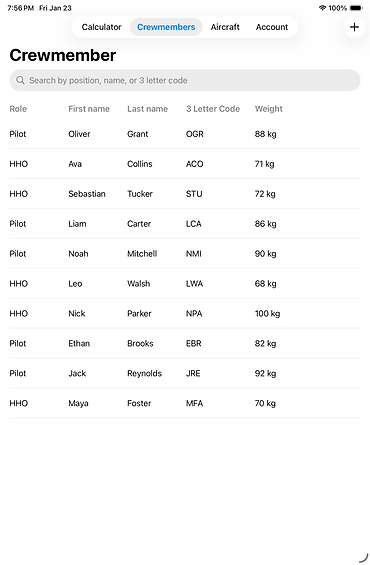
Add Crewmember & Aircrafts
%20-%202026-01-23%20at%2019_57_25.png)
Users can create and manage crew members by defining first name, last name, letter code, weight, and operational role.
Operational roles are currently defined as Pilot and HHO, with the system designed to be easily extendable to support additional roles for different mission types, such as Search and Rescue operations.
Aircraft profiles can also be created and managed, including tailnumber, home base, aircraft weight, and operational phase (AW169-specific). Additional configuration options, such as maximum gross weight increase kits or performance enhancement kits, can be added where applicable.
These inputs directly influence the performance calculations and determine the available operational performance for the selected aircraft.
Performance Calculator

Results
This page displays the calculated HOGE performance based on the selected aircraft, crew, and entered environmental conditions.
For documentation and traceability, fields such as Tailnumber and PIC of the flight are added automaticly to the result sheet.
The performance chart is derived from the AW169 RFM (External Hoist Operations) and visually shows the relationship between gross weight, pressure altitude, and temperature.
The marked reference lines indicate the applicable operating point for the entered conditions.
Calculated Results:
-
Payload on Site: Available load on site excluding Crew & Fuel
-
Useful Load on Site: Available load on site excluding Crew
-
Pressure Altitude: Calculated pressure altitude based on altitude and pressure setting.
-
Weight on Site: Aircraft weight at the hoist location including fuel and crew.
Wind Corrections:
-
Mass 0 Wind: Maximum allowable mass with no wind.
-
Mass add Headwind: Additional allowable mass from the entered headwind.
-
Mass full Headwind: Maximum allowable mass assuming full wind benefit.
-
Mass 75% Wind: Conservative allowable mass using 75% of the wind benefit.
All values are calculated for AW169 Phase 6 – OEI 2.5 min power and are intended for operational planning and decision support.
While current limits are based on AW169 Phase 6, the system is designed to be customisable and extendable for additional aircraft types and phases.
Select the aircraft and crew for the hoist mission.
The Dry Operating Mass (DOM) is automatically calculated from the selected aircraft and assigned crew members. It can also be entered manually if aircraft or crew are not in the system.
-
Aircraft: Choose the active aircraft profile. Aircraft data and phase are used for the calculation.
-
Crew (PIC / SIC / HHO): Optional selection. Crew weights are added to the aircraft weight and included in the DOM.
-
Input fields define the environmental and performance conditions:
-
Fuel on Site: Fuel at the hoist location.
-
Hover Height (MSL): Planned hover height above mean sea level.
-
Altimeter / QNH: Enter the pressure setting.
Activating “Change Altimeter to hPa” switches the input from Altimeter (inHg) to QNH (hPa). -
Temperature: Outside air temperature at hover height.
-
Headwind (optional): Effective headwind component.
-
Wind Benefit (optional): Percentage of wind benefit applied.
If no headwind or wind benefit is entered, default values are applied automatically (0 knots and 100% wind benefit).
Tap Calculate to generate the hoist performance result or Reset to clear all inputs.